SEO Writer for WordPress: articles write and publish themselves
Connect WordPress once — AI will generate 5,000+ word SEO articles and publish them with images, cover, meta tags and internal links without your involvement.
What it looks like inside
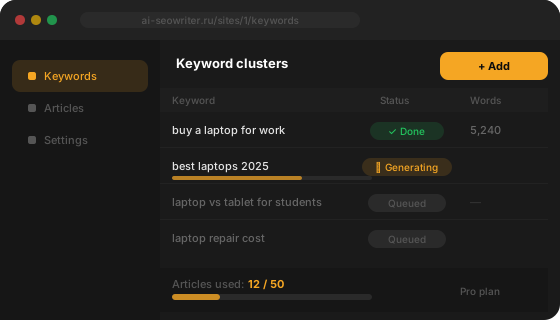
Simple interface: add keywords — get ready articles published to your CMS
Everything you need for SEO content
From keyword to published article — without manual work
AI writes for you
Advanced language models generate full SEO articles — with H2/H3, FAQ, internal links and meta tags.
Автопубликация в WordPress
Статья автоматически публикуется в WordPress с картинками, видео и корректными Yoast SEO полями.
Competitor research
AI with internet access analyzes top search results and gathers current facts for the article.
Publication scheduler
Set a schedule — the system will publish articles at the right time in your timezone.
Brand voice
AI studies your site and creates a unique editorial style used in every generation.
Keyword clusters
Upload keywords in bulk. The system determines search intent and generation queue automatically.
Auto-post to 4 social networks
After publishing, an announcement is automatically sent to Telegram, VK, Odnoklassniki and Pinterest.
Interactive blocks & Schema.org
Quizzes, checklists, polls, FAQ Schema, HowTo Schema — all generated automatically and embedded in the article.
WordPress integration features
Results — in minutes
Real articles generated in SEO Writer and published to WordPress
SEO Writer vs. alternatives
Compare cost and features — the difference is obvious
| Parameter | Copywriter | ChatGPT | SEO Writer |
|---|---|---|---|
| Написание статьи (1500 слов) | 2–4 часа | 20–40 мин вручную | < 5 минут |
| Публикация в WordPress | Вручную | Вручную | |
| Подбор и загрузка изображений | |||
| Генерация обложки (featured image) | |||
| SEO-мета (Yoast / Rank Math) | |||
| Публикация по расписанию | |||
| Анонс в соцсетях после публикации |
What users say
Real results from real people
“I used to pay 3–4 copywriters $15 per article and spend 2 days on approvals. Now I upload 20 keywords on Sunday — by Monday all articles are in WordPress. Organic traffic grew 40% in three months.”
“We manage 12 client sites. Content used to be the bottleneck — not anymore. SEO Writer generates texts with proper H1/H2/H3 structure, fills Yoast and internal links. Clients are happy, we can take on new ones.”
“We needed review articles for each product category. With SEO Writer we covered 60 queries in one month — with images, links to product pages and meta descriptions. That volume with copywriters would have cost $900.”
Who SEO Writer is for
One tool — for different tasks and scales
Website & blog owners
- Regular content without hiring writers
- Niche blogs with dozens of keyword queries
- Fast SEO start without an editorial budget
SEO agencies
- Managing dozens of client sites
- Scaling without growing headcount
- White-label articles with each brand's unique voice
Online stores
- Review and comparison articles for products
- Internal links to product pages
- Constant SEO traffic without ads
How to connect WordPress to SEO Writer
Takes less than 5 minutes
Создайте Application Password в WordPress
Зайдите в Пользователи → Ваш профиль → Application Passwords. Введите название «SEO Writer» и нажмите «Добавить». Скопируйте сгенерированный пароль — он нужен только один раз.
Добавьте сайт в SEO Writer
В личном кабинете нажмите «Добавить сайт», выберите WordPress, введите URL сайта, логин администратора и Application Password. Нажмите «Проверить подключение» — система убедится что всё работает.
Настройте голос бренда
Укажите нишу, целевую аудиторию и стиль текста. AI будет писать в вашем уникальном голосе — профессиональном, дружелюбном или экспертном.
Загрузите ключевые слова
Добавьте темы для статей — по одному запросу или загрузите список CSV. Укажите приоритет и желаемую частоту публикаций.
Включите автопилот
Задайте расписание и запустите. SEO Writer генерирует статью, публикует в WordPress в нужную категорию с картинками и SEO-мета — без вашего участия.
WordPress SEO articles on autopilot
WordPress powers over 43% of the global web — and for good reason: its flexibility, vast plugin ecosystem and ease of administration make it the top choice for blogs, online stores and corporate sites. But even a perfectly configured WordPress does not promote itself — it needs regular SEO content.
The problem: content takes time
A quality SEO article means 5–10 hours of work: competitor research, outline, writing, editing, image sourcing, meta tag setup and manual publishing. A one-person team realistically produces 4–8 articles per month — not enough for steady organic traffic growth.
Solution: SEO Writer + WordPress
SEO Writer automates the entire cycle — from keyword to published post. A 17-step pipeline handles each article:
- Research: AI with live internet access studies the top 10 results for your query and gathers current facts
- Writing: a 5,000+ word SEO article is generated with proper H2/H3 structure, LSI keywords and a FAQ block
- Media: images are sourced from Google Images, downloaded and uploaded to the WordPress media library with alt texts
- Cover: AI generates a unique Featured Image for the post via kie.ai
- SEO meta: title, meta description and slug are automatically filled — compatible with Yoast SEO and RankMath
- Internal linking: new articles receive links to previously published blog posts
- Publishing: the post goes live in the correct WordPress category at the scheduled time
Integration details
No plugins required — SEO Writer uses the native WordPress REST API. Authentication uses the standard Application Password mechanism available since WordPress 5.6. Compatible with any theme — Elementor, Divi, GeneratePress, Astra — and does not conflict with caching plugins.
Result: traffic growth without cost growth
Publishing 3–5 articles per week typically starts growing organic traffic within 4–8 weeks. After 3–6 months of regular publishing, the site accumulates 50–200 indexed SEO pages — each attracting additional visitors from search without an advertising budget.
Frequently Asked Questions
Нужно ли устанавливать плагин на WordPress?
Нет. SEO Writer использует встроенный WordPress REST API и стандартную функцию Application Password, доступную с WordPress 5.6. Никаких дополнительных плагинов устанавливать не нужно — только включить REST API (активирован по умолчанию) и создать Application Password в профиле пользователя.
Совместим ли SEO Writer с Yoast SEO и RankMath?
Да. SEO Writer заполняет стандартные мета-поля WordPress (post_title, post_excerpt, meta_description), которые Yoast SEO и RankMath используют для формирования сниппета в поиске. После публикации вы при желании можете скорректировать мета-данные прямо в плагине SEO.
Как изображения попадают в медиатеку WordPress?
SEO Writer находит релевантные изображения через SerpAPI (Google Images), скачивает их через ScraperAPI и загружает напрямую в медиатеку вашего WordPress через REST API. Каждое изображение получает автосгенерированный alt-текст с ключевым словом. Featured Image назначается из AI-обложки статьи.
Статьи публикуются сразу или сохраняются как черновики?
По умолчанию статьи публикуются сразу (статус published). Если вы хотите проверять тексты перед выходом — включите режим черновиков в настройках сайта. Статья сохранится в WordPress как черновик, вы прочитаете её и нажмёте «Опубликовать» вручную.
Как SEO Writer выбирает категорию для публикации?
Сервис синхронизирует список категорий вашего WordPress. При генерации статьи AI определяет наиболее подходящую категорию по теме и ключевому слову. Если подходящей нет — создаёт новую. Вы также можете указать категорию по умолчанию в настройках конкретного сайта.
Можно ли подключить несколько WordPress-сайтов?
Да. На тарифе Starter — 2 сайта, Pro — 5 сайтов, Agency — 20 сайтов. Каждый сайт настраивается независимо: свои ключевые слова, расписание, голос бренда, категории и подключённые соцсети.
Что делать, если REST API заблокирован плагином безопасности?
Некоторые плагины (Wordfence, iThemes Security) могут ограничивать REST API. Добавьте исключение для /wp-json/ в настройках плагина. SEO Writer использует аутентификацию через Application Password — это стандартный безопасный метод WordPress, одобренный командой разработчиков.
Pricing
Start free, scale as you grow
Starter
1 290 ₽ · billed in RUB
- 15 articles/month
- 2 sites
- System API keys
- Topic research: 4 runs/month
- Custom API keys
- Scheduler
- Article rewrite for external platforms
Pro
2 990 ₽ · billed in RUB
- 50 articles/month
- 5 sites
- System API keys
- Topic research: 10 runs/month
- Custom API keys
- Scheduler
- Article rewrite for external platforms
- Cover generation
Agency
9 990 ₽ · billed in RUB
- 150 articles/month
- 20 sites
- System API keys
- Topic research: 30 runs/month
- Custom API keys
- Scheduler
- Article rewrite for external platforms
- Cover generation
- API access (coming soon)
- Priority support
Secure payment via YooKassa · No auto-renewal · 30 days access


Start publishing to WordPress today
Free plan · 3 articles per month · No card required
Create free account →Useful articles
September 15, 2026
Токены нейросети: что это и как считать расход
Токены нейросети: чем токен отличается от слова, почему русский текст дороже английского и как считать расход генерации.
ReadSeptember 14, 2026
Перелинковка сайта: схемы, анкоры и типичные ошибки
Как устроена перелинковка страниц сайта: зачем она нужна, какие бывают схемы, сколько ссылок ставить в статью, как подобрать анкоры и каких ошибок избежать.
ReadSeptember 13, 2026
Поведенческие факторы: что это и как их улучшить
Что относится к поведенческим факторам, как Яндекс их считает, что реально можно улучшить текстом и чем заканчивается накрутка.
Read