Let your AI assistant connect the site for you
Paste the prompt into Claude Code, Cursor, Codex or any assistant already working in your project. It will add article receiving following your codebase conventions — your framework, routing and publication model. The prompt carries only the integration contract: the assistant needs no secrets and no internal service details.
Publishing to any website is included from the Starter plan.
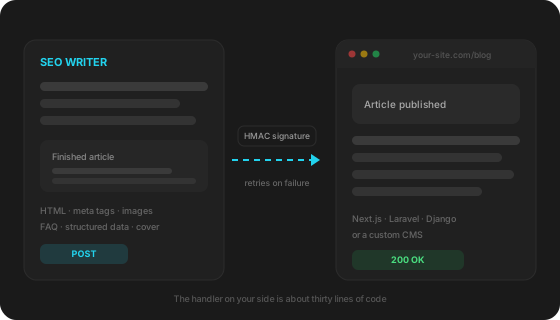
How it works
Get the key
Add a site with the “Any website” platform and copy the issued key. It never goes into the prompt: the key lives in the project environment and the assistant reads it from there.
Give the assistant the prompt
Paste the first prompt below into the assistant opened inside your project. It will find the existing publication model and wire article receiving into it.
Check the result
Press “Test connection”, then “Send a sample article” — it does not spend your quota. If the assistant went the wrong way, the second prompt brings it back to the existing architecture.
Handler for Claude Code · Cursor · Codex
The main prompt. The assistant adds the endpoint, signature verification and saving into your publication model. Note the constraints block at the end: it stops the assistant from “simplifying” security, which is the first thing such tools tend to suggest.
В моём проекте нужен серверный обработчик вебхука от сервиса SEO Writer.

Добавь POST-эндпоинт по адресу /api/seowriter, используя текущий стек проекта, его роутинг и ORM.
Не создавай отдельный микросервис, если в проекте уже есть серверная часть.

Запрос приходит с заголовками:
  X-SEOWriter-Event: article.published | article.updated | ping
  X-SEOWriter-Timestamp: unix-время в секундах
  X-SEOWriter-Signature: v1=<hex>[,v1=<hex>]
  X-SEOWriter-Delivery: идентификатор доставки, одинаковый на всех повторах

Тело запроса — JSON вида:
{ "event": "article.published",
  "article": { "id": "uuid", "status": "draft|publish", "title": "...", "h1": "...", "slug": "...",
               "content_html": "...", "excerpt": "...", "meta": {"title": "...", "description": "..."},
               "cover": {"url": "...", "alt": "..."}, "images": [{"url": "...", "alt": "..."}],
               "faq": [{"question": "...", "answer": "..."}], "json_ld": [...] } }

Реализуй по шагам:
1. Прочитай тело как сырые байты или текст ДО разбора JSON.
2. Посчитай HMAC-SHA256 от строки "{timestamp}.{сырое тело}" с ключом из переменной окружения SEOWRITER_SECRET.
3. Заголовок подписи может содержать несколько значений v1= через запятую — проверь КАЖДОЕ, любое совпадение считается верным. Сравнивай безопасным сравнением, не обычным равенством.
4. Отклони запрос кодом 401, если подпись не сошлась или если время отличается от текущего больше чем на 300 секунд.
5. На событие ping ответь 200 и JSON {"success": true}.
6. На article.published и article.updated сохрани статью в существующую модель публикаций проекта, обновляя запись по article.id — повторная доставка не должна создавать дубль. Для тела страницы используй content_html как готовый HTML.
7. Ответь 200 и JSON {"ok": true, "url": "<адрес опубликованной статьи>"} — адрес нужен сервису для внутренней перелинковки.
8. Отвечай быстро: тяжёлую обработку выноси в фоновую задачу.

Ограничения:
- не хардкодь секрет, читай его из переменной окружения;
- не отключай проверку подписи даже временно;
- не отвечай переадресацией;
- принимай только POST.

В конце скажи, какой полный адрес эндпоинта получится после деплоя и куда добавить SEOWRITER_SECRET.
Assistants love to invent: a new model, a separate admin panel, sometimes a whole second blog. This text brings them back to the existing architecture and makes them re-check that the security checks survived the rework.
Не изобретай новую архитектуру. Встрой обработчик в существующую систему публикаций проекта.

Сначала найди:
- где в проекте уже хранятся статьи, посты блога или страницы;
- какой маршрут отвечает за публикации и как он строится;
- какая модель или таблица хранит контент.

После этого:
- используй существующую модель публикаций, если она подходит по смыслу;
- если она отличается, добавь только недостающие поля, а не новую сущность;
- не создавай вторую админку и не трогай клиентские страницы без необходимости;
- не заводи отдельный микросервис ради одного эндпоинта.

Если не можешь однозначно определить, где проект хранит статьи, — не импровизируй, а задай мне конкретный вопрос по структуре проекта.

И отдельно проверь, что при переделке ты не ослабил проверки: подпись по-прежнему проверяется, сравнение безопасное, время запроса контролируется, метод только POST.
Saving the article is not enough — usually it should appear in the publication list with the existing styling. If pages are pre-built, this prompt also triggers a rebuild.
Доработай обработчик так, чтобы каждая принятая статья сразу появлялась в публичном разделе блога проекта.

Правила:
1. Используй текущую архитектуру: тот же бэкенд, маршрутизацию, ORM или контентную папку.
2. Не создавай второй блог и параллельный раздел, если список статей в проекте уже есть.
3. Найди, как сейчас формируется страница списка публикаций: /blog, /articles, /news или другой существующий маршрут.
4. После приёма события article.published статья должна попасть в этот список и открываться по своему адресу.
5. Используй существующие шаблоны, стили и карточки — не добавляй собственную вёрстку, если в проекте уже есть оформление списка.
6. Если страницы собираются заранее, запусти пересборку или сброс кэша после сохранения, чтобы статья появилась без ручного деплоя.
7. Для тела страницы бери content_html как готовый HTML, для превью — excerpt, для картинки карточки — cover.url.
8. Верни в ответе полный адрес опубликованной страницы в поле url.

Если в проекте раздела блога нет вообще — скажи об этом прямо и предложи минимальный вариант в существующей архитектуре, но не начинай его делать без моего ответа.
What arrives with every article
Not just HTML: everything a page needs comes as separate fields, so there is no need to parse the text with regular expressions.
| article.id | Permanent article id. Update your record by it so a repeated delivery does not create a duplicate |
| article.status | draft or publish — publish right away or keep as a draft |
| article.title, h1, slug | Title, H1 and slug |
| article.content_html | Ready article HTML with structured data inside |
| article.meta | Meta title and description for the title tag and meta description |
| article.cover | Cover: URL, alt and whether the link is permanent |
| article.images | Images from the text. Each says whether it is hosted by us or by a third party |
| article.faq | Question and answer pairs — if you render your own FAQ block instead of parsing HTML |
| article.json_ld | Schema.org markup blocks as separate objects |
| article.category | Category if one is set in site settings |
Who webhook delivery is for
Developers of custom projects
The site is hand-written or built on a framework, and a ready integration for it does not exist and never will. The handler takes thirty lines and lives in your repository along with the rest of the code.
Agencies with a mixed client base
One client runs WordPress, another a custom admin panel, a third Next.js. The webhook removes the question “do you support this CMS”: any of them works, and all client sites live in one account.
Headless projects and static sites
Content lives in your own database or a headless CMS while pages are built at deploy time. The handler saves the article and triggers a rebuild, so the publication appears without a manual commit.
By hand versus by webhook
An article can always be moved by hand — the question is what that costs over time.
| By hand | By webhook | |
|---|---|---|
| Getting an article onto the site | Copying text, images and meta tags by hand | Arrives ready within seconds after generation |
| Time per article | 20–30 minutes of transferring and formatting | Zero: no human involved |
| Images and cover | Download, upload, set alt text | Arrive as links, the cover as a separate field |
| Structured data and FAQ | Assemble manually or forget about it | Ready Schema.org blocks as separate fields |
| Scheduled publishing | Someone has to be there at the right hour | Runs on its own, even at night |
| If the site was down | The article waits until someone remembers it | Six retries over eight hours plus a delivery log |
Security
- Every request is signed with a key known only to you and us.
- The signature timestamp prevents replaying a captured request: anything older than five minutes is rejected.
- We send over https only and never follow redirects.
- The key can be rotated: for 24 hours requests carry both the old and the new signature so your handler can catch up.
FAQ
Is it safe to hand this to an AI?
The prompt carries no key and no internal service details — only the contract: which headers arrive, what the body holds and how to verify the signature. You put the key into the environment yourself, and the prompt explicitly forbids hardcoding secrets or disabling checks.
What do assistants most often get wrong?
Three things. First: parsing the body and re-serialising it before verification — then the signature never matches. Second: comparing signatures with plain equality instead of a constant-time comparison. Third: creating its own article model instead of the existing one, which yields a second blog next to the real one. The prompts cover all three, but the result is still worth reviewing.
Which assistants work?
Any that works inside the codebase and can edit files: Claude Code, Cursor, Codex, Windsurf, Copilot in agent mode. The prompt is not tied to a specific tool — what matters is that the assistant can see your project.
What if I am not a developer?
Then it is easier to take a ready handler file for your stack — there are four, and they need no edits beyond pasting the key. The assistant path is for those who already have the project open in an AI-enabled editor.
What users say
Real results from real people
“I have been running a football blog for over 5 years and always wrote myself or hired authors at 2,000–3,000 rubles per article. I tried SEO Writer sceptically. A month later 23 new articles were indexed, three months later traffic was up 60%. Now I pay for the Starter plan and save about 40,000 ₽ a month on texts. The quality is honestly no worse than a good copywriter, the structure is correct and logical.”

“Content was always the bottleneck — we take on clients quickly, but finding authors for each project takes long. SEO Writer solved this completely. We set up 8 sites, each publishing 3–4 articles a week. We especially value native support for Bitrix and InSales, since half of our clients use them. No Western tool can do that.”

“Our store runs on InSales with lots of products, and the blog stood empty for three years. We connected SEO Writer and published 27 articles for informational queries in two months. Now about 30% of new customers come from organic search, while before we relied only on paid ads. I like that articles add internal links to our products and categories by themselves — nothing to do by hand.”

“Your service is great, and the support is mind-blowing — thank you!”
Pricing
Start free, scale as you grow
Free
- 3 articles/month
- 1 site
- System API keys
- Topic research: 1 runs/month
- Article editor with version history
Starter
1 290 ₽ · billed in RUB
- 15 articles/month
- 2 sites
- System API keys
- Topic research: 4 runs/month
- Article editor with version history
- Custom API keys
- Scheduler
- Yandex Webmaster in the dashboard
- “Write a section”: 30 a month
- “Improve the article” from Webmaster queries
- Article rewrite for external platforms
- Cover generation
Pro
2 990 ₽ · billed in RUB
- 50 articles/month
- 5 sites
- System API keys
- Topic research: 10 runs/month
- Article editor with version history
- Custom API keys
- Scheduler
- Yandex Webmaster in the dashboard
- “Write a section”: 100 a month
- “Improve the article” from Webmaster queries
- Article rewrite for external platforms
- Cover generation
Agency
9 990 ₽ · billed in RUB
- 150 articles/month
- 20 sites
- System API keys
- Topic research: 30 runs/month
- Article editor with version history
- Custom API keys
- Scheduler
- Yandex Webmaster in the dashboard
- “Write a section”: 300 a month
- “Improve the article” from Webmaster queries
- Article rewrite for external platforms
- Cover generation
- API access (coming soon)
- Priority support
Secure payment via YooKassa · No auto-renewal · 30 days access
See also
What if you run a popular CMS
For these platforms no handler is needed — connecting takes a couple of minutes with a login and a password.
Your site starts filling itself
Setup takes half an hour including the handler. After that articles arrive on schedule and every delivery is visible in your account.
Create a free account →