Articles for a Python site without manual work
Add a csrf_exempt view, verify the signature with hmac.compare_digest and save the article using update_or_create keyed by our service id. For FastAPI the code is the same, only the way of reading the request body differs.
Publishing to any website is included from the Starter plan.
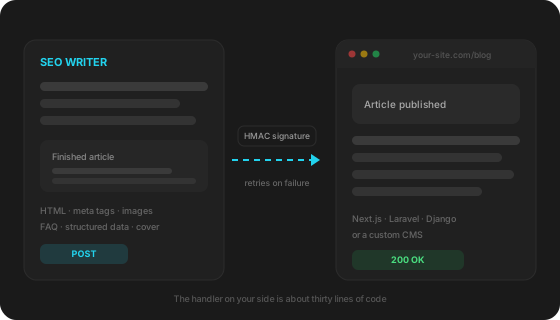
How it works
Add the view and the route
csrf_exempt is required: the request comes from outside and carries no token. In FastAPI nothing needs to be excluded.
Set the key
SEOWRITER_SECRET in the environment. Restart the app after adding it.
Add a field to the model
seowriter_id with unique=True — the record is looked up by it so a repeated delivery updates the article instead of creating a second one.
Handler for Django · FastAPI
The body comes from request.body — raw bytes. The signed string is “timestamp.body”, algorithm HMAC-SHA256. The timestamp inside the signature prevents replay of a captured request: reject anything older than five minutes. The header may carry several signatures separated by commas — that is the 24 hours after a key rotation, and every one of them must be checked.
import hashlib, hmac, json, time
from django.http import JsonResponse
from django.views.decorators.csrf import csrf_exempt
from django.views.decorators.http import require_POST

SECRET = os.environ["SEOWRITER_SECRET"]

@csrf_exempt          # запрос приходит извне, csrf-токена у него нет
@require_POST
def seowriter_webhook(request):
    raw = request.body
    timestamp = request.headers.get("X-SEOWriter-Timestamp", "")
    header = request.headers.get("X-SEOWriter-Signature", "")
    event = request.headers.get("X-SEOWriter-Event", "")

    if abs(time.time() - int(timestamp or 0)) > 300:
        return JsonResponse({"ok": False, "error": "stale"}, status=401)

    expected = hmac.new(SECRET.encode(), timestamp.encode() + b"." + raw, hashlib.sha256).hexdigest()
    valid = any(
        hmac.compare_digest(expected, part.strip()[3:])
        for part in header.split(",") if part.strip().startswith("v1=")
    )
    if not valid:
        return JsonResponse({"ok": False}, status=401)

    if event == "ping":
        return JsonResponse({"success": True, "cms": "Django"})

    article = json.loads(raw)["article"]

    # Ключ — seowriter_id: повторная доставка обновит запись, а не создаст вторую
    post, _ = Post.objects.update_or_create(
        seowriter_id=article["id"],
        defaults={
            "title": article["h1"],
            "slug": article["slug"],
            "body": article["content_html"],
            "excerpt": article["excerpt"],
            "meta_title": article["meta"]["title"],
            "meta_description": article["meta"]["description"],
            "cover_url": (article.get("cover") or {}).get("url"),
            "is_published": article["status"] == "publish",
        },
    )

    # Верните url — от него зависят внутренняя перелинковка и анонсы в соцсетях
return JsonResponse({"ok": True, "id": post.id, "url": f"https://site.ru/blog/{post.slug}"})Only reading the body differs: await request.body() instead of request.body.
@router.post("/api/seowriter")
async def seowriter_endpoint(request: Request):
    raw = await request.body()
    timestamp = request.headers.get("x-seowriter-timestamp", "")
    header = request.headers.get("x-seowriter-signature", "")
    # дальше проверка подписи и сохранение — тот же код, что выше
What arrives with every article
Not just HTML: everything a page needs comes as separate fields, so there is no need to parse the text with regular expressions.
| article.id | Permanent article id. Update your record by it so a repeated delivery does not create a duplicate |
| article.status | draft or publish — publish right away or keep as a draft |
| article.title, h1, slug | Title, H1 and slug |
| article.content_html | Ready article HTML with structured data inside |
| article.meta | Meta title and description for the title tag and meta description |
| article.cover | Cover: URL, alt and whether the link is permanent |
| article.images | Images from the text. Each says whether it is hosted by us or by a third party |
| article.faq | Question and answer pairs — if you render your own FAQ block instead of parsing HTML |
| article.json_ld | Schema.org markup blocks as separate objects |
| article.category | Category if one is set in site settings |
Who webhook delivery is for
Developers of custom projects
The site is hand-written or built on a framework, and a ready integration for it does not exist and never will. The handler takes thirty lines and lives in your repository along with the rest of the code.
Agencies with a mixed client base
One client runs WordPress, another a custom admin panel, a third Next.js. The webhook removes the question “do you support this CMS”: any of them works, and all client sites live in one account.
Headless projects and static sites
Content lives in your own database or a headless CMS while pages are built at deploy time. The handler saves the article and triggers a rebuild, so the publication appears without a manual commit.
By hand versus by webhook
An article can always be moved by hand — the question is what that costs over time.
| By hand | By webhook | |
|---|---|---|
| Getting an article onto the site | Copying text, images and meta tags by hand | Arrives ready within seconds after generation |
| Time per article | 20–30 minutes of transferring and formatting | Zero: no human involved |
| Images and cover | Download, upload, set alt text | Arrive as links, the cover as a separate field |
| Structured data and FAQ | Assemble manually or forget about it | Ready Schema.org blocks as separate fields |
| Scheduled publishing | Someone has to be there at the right hour | Runs on its own, even at night |
| If the site was down | The article waits until someone remembers it | Six retries over eight hours plus a delivery log |
Security
- Every request is signed with a key known only to you and us.
- The signature timestamp prevents replaying a captured request: anything older than five minutes is rejected.
- We send over https only and never follow redirects.
- The key can be rotated: for 24 hours requests carry both the old and the new signature so your handler can catch up.
Hand the setup to your AI
Paste this prompt into Claude Code, Cursor or Codex inside your own project: it describes the contract without secrets, and the assistant wires the handler in following your codebase conventions.
My project needs a server-side webhook handler for the SEO Writer service.

Add a POST endpoint at /api/seowriter using the project's current stack, routing and ORM.
Do not create a separate microservice if the project already has a backend.

The request arrives with these headers:
  X-SEOWriter-Event: article.published | article.updated | ping
  X-SEOWriter-Timestamp: unix time in seconds
  X-SEOWriter-Signature: v1=<hex>[,v1=<hex>]
  X-SEOWriter-Delivery: delivery id, identical across retries

The body is JSON:
{ "event": "article.published",
  "article": { "id": "uuid", "status": "draft|publish", "title": "...", "h1": "...", "slug": "...",
               "content_html": "...", "excerpt": "...", "meta": {"title": "...", "description": "..."},
               "cover": {"url": "...", "alt": "..."}, "images": [{"url": "...", "alt": "..."}],
               "faq": [{"question": "...", "answer": "..."}], "json_ld": [...] } }

Implement step by step:
1. Read the body as raw bytes or text BEFORE parsing JSON.
2. Compute HMAC-SHA256 over "{timestamp}.{raw body}" with the key from the SEOWRITER_SECRET environment variable.
3. The signature header may hold several v1= values separated by commas — check EVERY one, any match counts. Use a constant-time comparison, not plain equality.
4. Reject with 401 if the signature does not match or the timestamp differs from now by more than 300 seconds.
5. Answer ping with 200 and JSON {"success": true}.
6. On article.published and article.updated save the article into the project's existing publication model, updating the record by article.id — a repeated delivery must not create a duplicate. Use content_html as the ready page body.
7. Answer with 200 and JSON {"ok": true, "url": "<published article URL>"} — the service needs that URL for internal linking.
8. Answer fast: move heavy processing into a background job.

Constraints:
- never hardcode the secret, read it from the environment;
- never disable signature verification, not even temporarily;
- never answer with a redirect;
- accept POST only.

At the end, tell me the full endpoint URL after deployment and where to add SEOWRITER_SECRET.
FAQ
Wagtail, Django CMS — will it work?
Yes. Only what you do with the article inside the handler changes: instead of your own model you create a page of the right type. The signature check and the contract stay the same.
How do I test the handler without spending articles?
Site settings have Send a sample article — a real event with demo content arrives, but your monthly quota is untouched. Next to it is Test connection which sends only a probe request.
The signature does not match even though the key is right
Two usual causes. First: the body was parsed and re-serialised — the raw bytes are signed, not the result of another serialisation. Second: the server clock drifted, so the request looks stale. Check clock synchronisation.
Do I need to answer the update event?
Yes, at least with a 200. article.updated delivers the cover if it was rendered after publication, plus any article edits. A handler that answers with an error to that event is treated as broken and delivery is paused.
What users say
Real results from real people
“I have been running a football blog for over 5 years and always wrote myself or hired authors at 2,000–3,000 rubles per article. I tried SEO Writer sceptically. A month later 23 new articles were indexed, three months later traffic was up 60%. Now I pay for the Starter plan and save about 40,000 ₽ a month on texts. The quality is honestly no worse than a good copywriter, the structure is correct and logical.”

“Content was always the bottleneck — we take on clients quickly, but finding authors for each project takes long. SEO Writer solved this completely. We set up 8 sites, each publishing 3–4 articles a week. We especially value native support for Bitrix and InSales, since half of our clients use them. No Western tool can do that.”

“Our store runs on InSales with lots of products, and the blog stood empty for three years. We connected SEO Writer and published 27 articles for informational queries in two months. Now about 30% of new customers come from organic search, while before we relied only on paid ads. I like that articles add internal links to our products and categories by themselves — nothing to do by hand.”

“Your service is great, and the support is mind-blowing — thank you!”
Pricing
Start free, scale as you grow
Free
- 3 articles/month
- 1 site
- System API keys
- Topic research: 1 runs/month
- Article editor with version history
Starter
1 290 ₽ · billed in RUB
- 15 articles/month
- 2 sites
- System API keys
- Topic research: 4 runs/month
- Article editor with version history
- Custom API keys
- Scheduler
- Yandex Webmaster in the dashboard
- “Write a section”: 30 a month
- “Improve the article” from Webmaster queries
- Article rewrite for external platforms
- Cover generation
Pro
2 990 ₽ · billed in RUB
- 50 articles/month
- 5 sites
- System API keys
- Topic research: 10 runs/month
- Article editor with version history
- Custom API keys
- Scheduler
- Yandex Webmaster in the dashboard
- “Write a section”: 100 a month
- “Improve the article” from Webmaster queries
- Article rewrite for external platforms
- Cover generation
Agency
9 990 ₽ · billed in RUB
- 150 articles/month
- 20 sites
- System API keys
- Topic research: 30 runs/month
- Article editor with version history
- Custom API keys
- Scheduler
- Yandex Webmaster in the dashboard
- “Write a section”: 300 a month
- “Improve the article” from Webmaster queries
- Article rewrite for external platforms
- Cover generation
- API access (coming soon)
- Priority support
Secure payment via YooKassa · No auto-renewal · 30 days access
See also
What if you run a popular CMS
For these platforms no handler is needed — connecting takes a couple of minutes with a login and a password.
Your site starts filling itself
Setup takes half an hour including the handler. After that articles arrive on schedule and every delivery is visible in your account.
Create a free account →