Internal Links and the Link Index
Table of Contents
What Is the Link Index
After every successful publish, AI SEO Writer automatically saves the article's data to an index: URL, title, target keyword, meta description. When writing future articles, the AI uses this index to insert relevant links to previously published content.
Why It Matters
Improves user engagement — visitors follow internal links
Boosts the authority of older pages in search engines
Helps search crawlers discover and navigate your site
Creates natural internal linking without manual effort
How It Works
At step 6 of the pipeline, the AI receives the list of published articles from the index and inserts 2–4 relevant internal links into the article text. Links are selected based on semantic relevance to the current article's topic.
Important: internal links are only inserted from articles that are already published on your site. Drafts and articles without a final URL are not added to the index.
Managing the Index
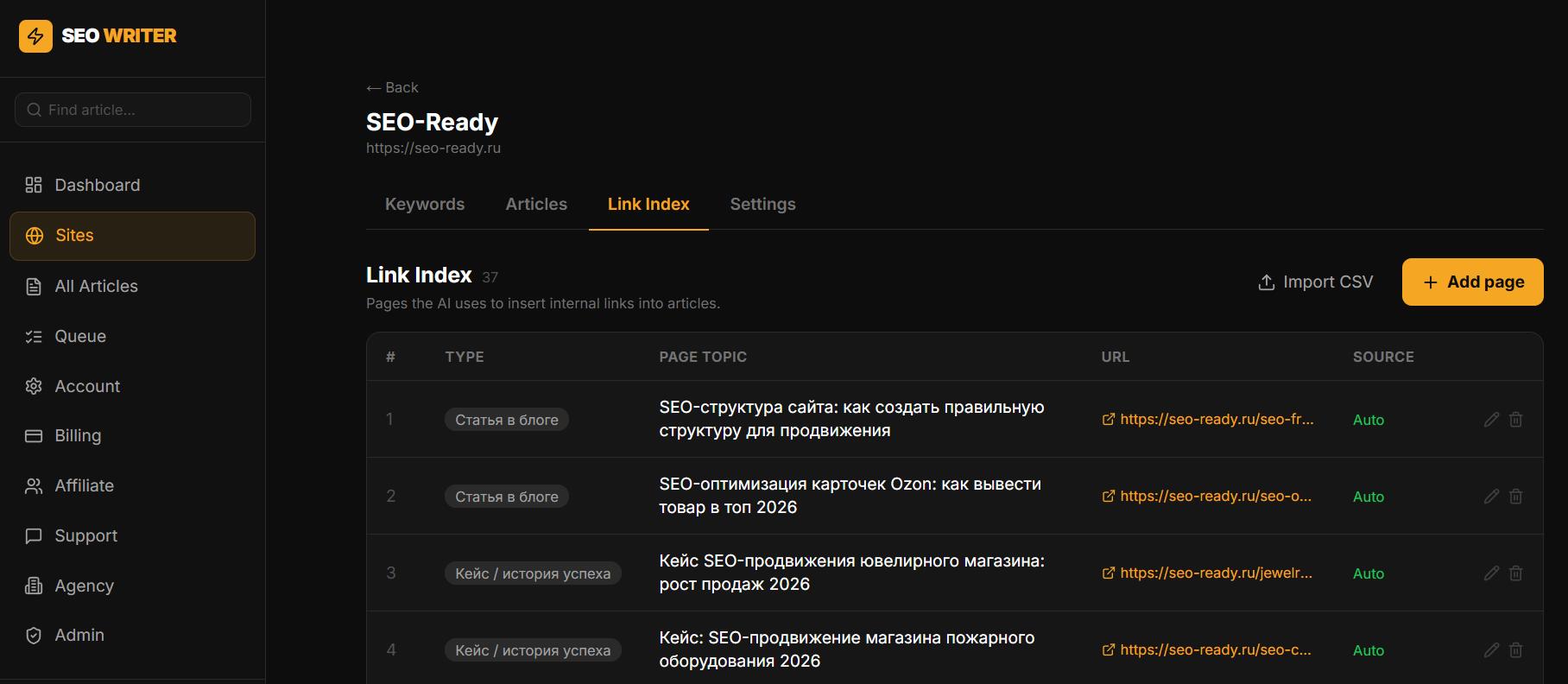
Go to Sites → [Your site] → Link Index. From there you can:
View all indexed pages with their URL and title
Delete irrelevant entries — e.g. outdated or deleted pages
Add manually older articles from your site so the AI can link to them
Adding Existing Articles Manually
If your site already has published content before connecting to AI SEO Writer, add those articles to the index manually. This immediately improves internal linking quality for new generations.
Clearing the Index
If the index is cluttered with irrelevant entries, clear it completely using Clear index and re-add the relevant pages manually.
If articles carry few links, start with the sitemap: that is where the service takes pages for linking from. You can inspect it with the sitemap analyzer.
In this section
Was this article helpful?