Completing Onboarding
Table of Contents
The Onboarding Wizard
After registering, you're guided through a short onboarding wizard. It takes 3–5 minutes and helps set up the service for your site.
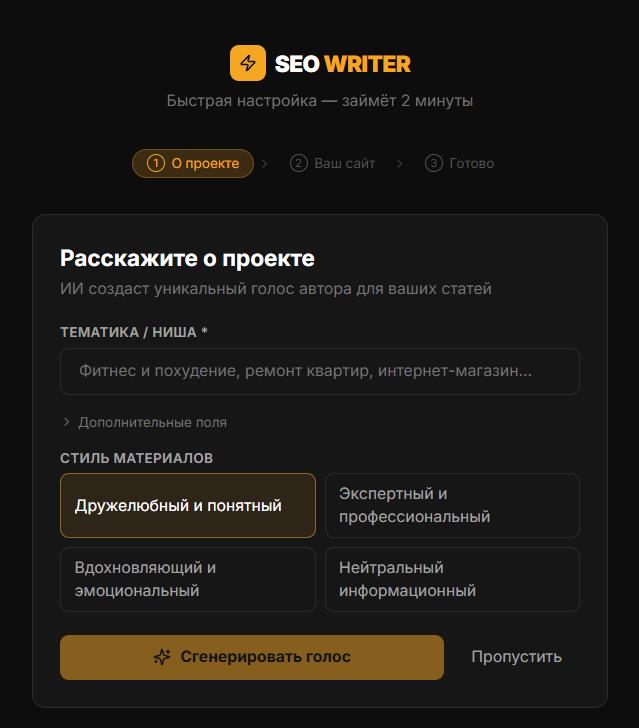
Step 1: Brand Voice and Style
Fill in information about your project — the AI uses it to generate a Voice Profile:
Niche — e.g., "home renovation supplies store"
Target audience — e.g., "homeowners aged 30–50"
Tone — Expert, Friendly, Inspiring, or Neutral
Site URL (optional) — AI analyzes your site's existing style
The Voice Profile generated here is applied to every article. You can edit or regenerate it in site settings at any time.
Step 2: Connect Your Site
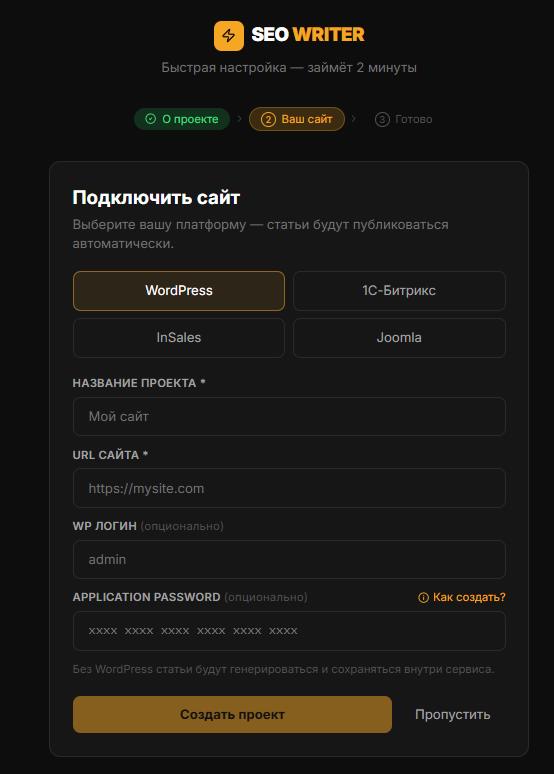
Choose a CMS (WordPress, 1С-Bitrix, InSales, Joomla) and enter connection credentials. Click Test connection. You can skip this step and add a site later in the Sites section.
Step 3: Done
Onboarding is complete. You're redirected to the keywords page of your connected site.
Do You Need API Keys Immediately?
No. All plans (including Free) use system API keys that work out of the box. Adding your own keys is optional — it gives you independent rate limits. Personal keys can be added in Account → My API Keys (available on Starter and above).
In this section
Was this article helpful?