Publishing Scheduler
Table of Contents
What the Scheduler Does
The scheduler automatically generates articles on a recurring schedule. At the configured time, the service triggers generation for the next highest-priority keyword.
Setting Up a Schedule
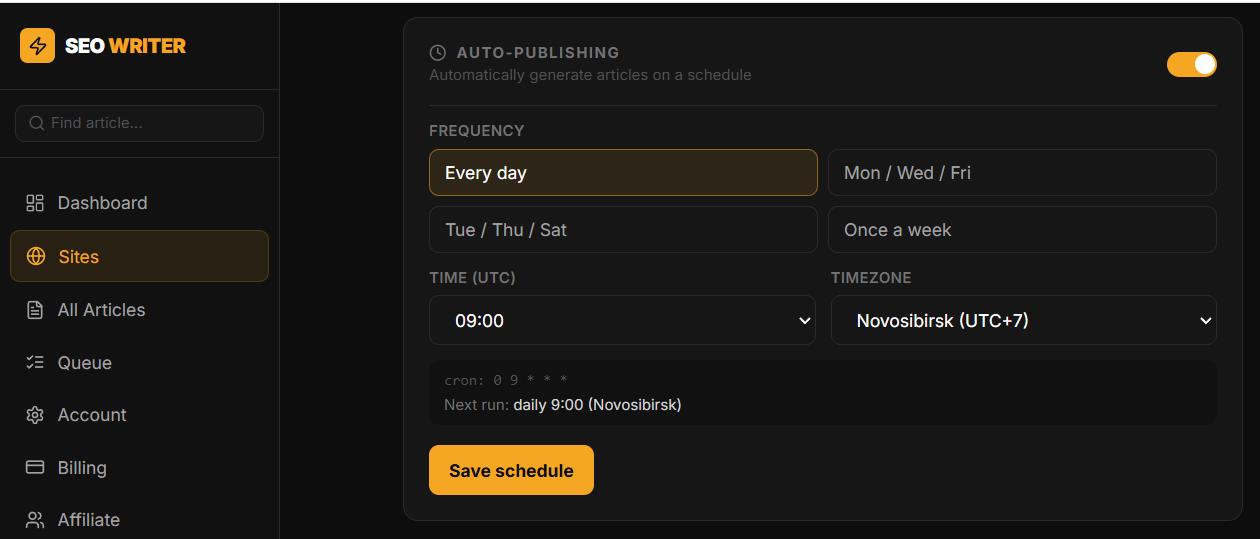
Go to Sites → [Your site] → Settings → Auto-publishing
Enable auto-publishing
Select frequency:
Every day
Every Monday
Mon / Wed / Fri
Tue / Thu / Sat
Every Sunday
Set the publication time and your timezone
Click Save schedule
How Articles Are Selected
On each scheduled run, the service picks the keyword with the highest priority that hasn't been generated yet (Pending status). If none exist, the run is skipped automatically.
The scheduler checks every 15 minutes, so your article will start within 15 minutes of the configured time.
Agency Approval Mode
If the site has "Require agency approval" enabled, scheduled articles will wait for manager approval before publishing — the scheduler still runs normally.
Monitoring
All scheduled runs appear in the Queue section in the sidebar with their status and current step.
In this section
Was this article helpful?