Connecting WordPress
Table of Contents
What you'll need
Your WordPress site URL
WordPress administrator login
Application Password (not your regular password!)
Creating an Application Password
Step 1: Open your user profile
In WordPress admin go to: Users → Your Profile (or /wp-admin/profile.php).
Step 2: Find the "Application Passwords" section
Scroll down to the "Application Passwords" section. Enter a name (e.g., "SEO Writer") and click "Add New Application Password".
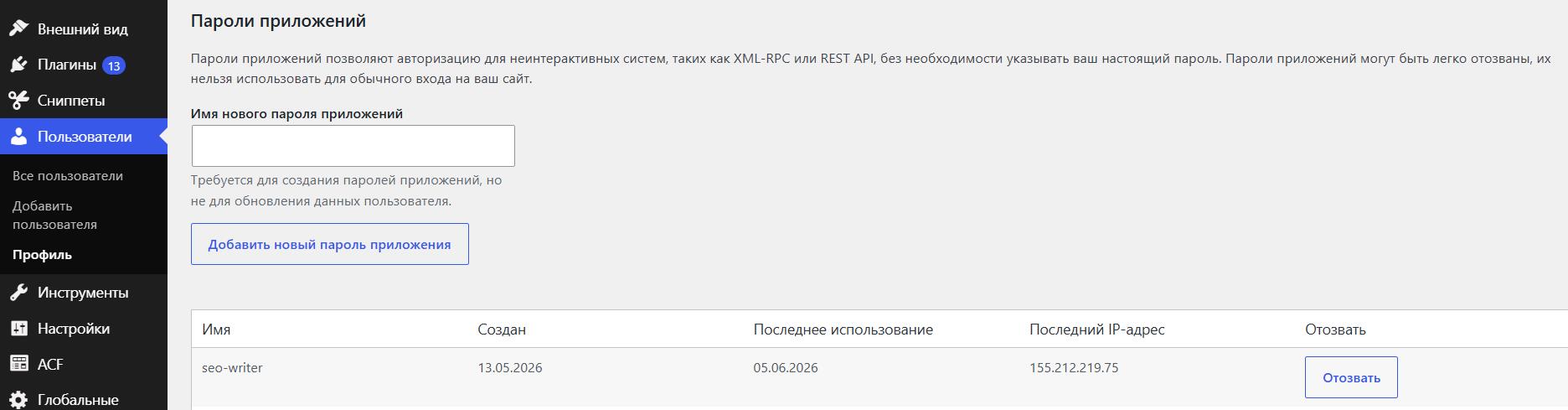
Step 3: Copy the password
WordPress will show the password in format XXXX XXXX XXXX XXXX XXXX XXXX. Copy it — it won't be shown again!
Connecting in AI SEO Writer
Go to Sites → Add Site
Select platform WordPress
Enter your site URL (no trailing slash)
Enter your WordPress login
Paste the Application Password
Click "Test Connection"
Common Connection Errors
REST API blocked — make sure /wp-json/ is accessible without redirects. Reset permalinks: Settings → Permalinks → Save.
Error 403 Forbidden — check user role (Editor or Administrator required)
XML-RPC — not required; AI SEO Writer uses the REST API only
Security plugins — Wordfence, iThemes Security, and similar plugins can block the REST API. Temporarily disable all security plugins and test; re-enable them one by one to find the culprit. See WordPress Connection Errors for detailed solutions.
Updating Connection Credentials
If you need to change your Application Password or other details — do not delete the site. Deleting it will remove the internal link index and article history.
Instead:
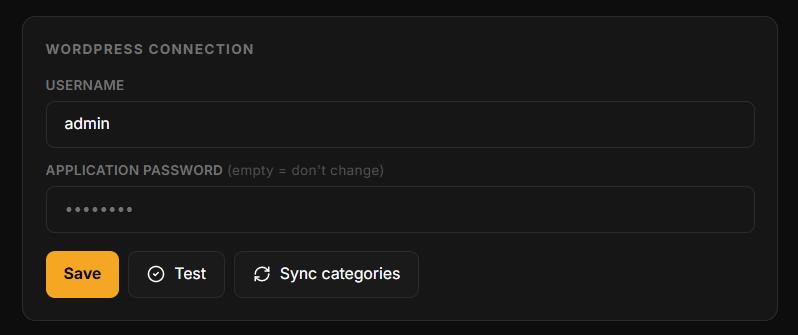
Go to Sites → [Your site] → Settings → Connection
Update the relevant fields (URL, username, or Application Password)
Click Test connection, then Save
In this section
Was this article helpful?